Best AI Workflow Automation Tools to Boost Productivity 2026
If you are facing an issue in completing your work on time due to repetitive work that takes a large amount of time. This not only wastes your time but also slows your decision-making, which affects your business or work in real time. However, if you are looking for a way to address this situation, AI workflow automation tools can be an ideal choice. This helps you to automate your business, handle several clients on a single dashboard without needing to switch platforms, automate repetitive tasks, and much more within a few clicks.
Whether you are looking to save your time or want a better output that actually contributes to growing your business, using an automation workflow tool is the best choice. In this comprehensive guide, we will walk you through the best automation tools, working processes, their features, and pros and cons. This will help you to make a confirmed decision as per your needs. Therefore, do not jump anywhere else because everything you need to know is provided in this guide.
What Are AI Workflow Automation Tools?
AI tools for personal productivity automation tools use artificial intelligence to complete repetitive tasks without interfering manually. It allows you to schedule your work automatically within a few clicks. The best thing is that smart AI workflow tools can understand the process and take action accordingly. Apart from this, you can connect your favourite apps like Gmail, Notion, Google Sheets, and many more with a single click.
Moreover, AI workflow automation tools help you automate and manage your business and your clients without using several apps or tabs. You can take all the updates from your clients on a single dashboard.
Best AI Workflow Automation Tools
Here we have listed some of the best AI workflow automation tools that will not only help you to automate your business but also to complete repetitive tasks within a few clicks. Therefore, to know everything, check the tool listed below.
Zapier – Best AI Tool
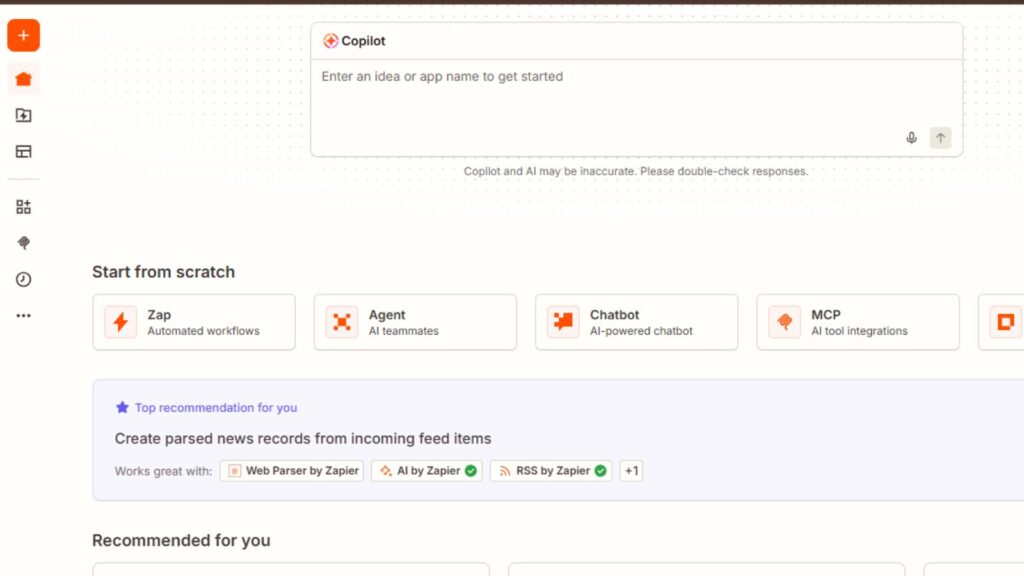
Zapier is known for its rich features with a no-code workflow automation platform used by several leading businesses in the United States. Moreover, the tool allows users to connect applications like Gmail, Notion, Google Sheets, HubSpot, Shopify, and many more without needing to write code. Zapier is dedicatedly focusing on making automation simple for non-technical users who have no idea of technology. Today, across the world, various startups, agencies, and e-commerce brands are using this tool to obtain better results. Whether you are looking for the best AI tool for proposal writing or anything else. Zapier offers you everything in a single place.
- Best For
- The tool is best for beginners due to no coding needed.
- Helps to achieve better results for various small businesses.
- Zapier is best for e-commerce stores.
- Best for marketing agencies.
- Ideal for non-technical users and teams.
- Key Strength
- It has more than 8000 application integrations to date.
- The tool has a beginner-friendly interface that makes it easier.
- Offer easy and automated setup for users.
- Zapier has a large automation template system.
- Pros
- Easy to learn.
- Zapier offers one of the best application support for users.
- It saves your valuable time while operating.
- Offer reliable cloud automation.
- Offer strong community support.
- Cons
- The tool is expensive at scale.
- offer very limited customization options for developers.
- Its advanced workflows feel messy.
- Real Use Case of Zapier
In the United States, an E-commerce brand uses the Zapier AI tool to collect Shopify orders automatically without needing any human interaction. Moreover, they use this tool to send customer data to Hubsport, create AI-powered follow-up emails, and to notify their sales on Slack without manual command.
N8N – Best Tool For Workflow Automation
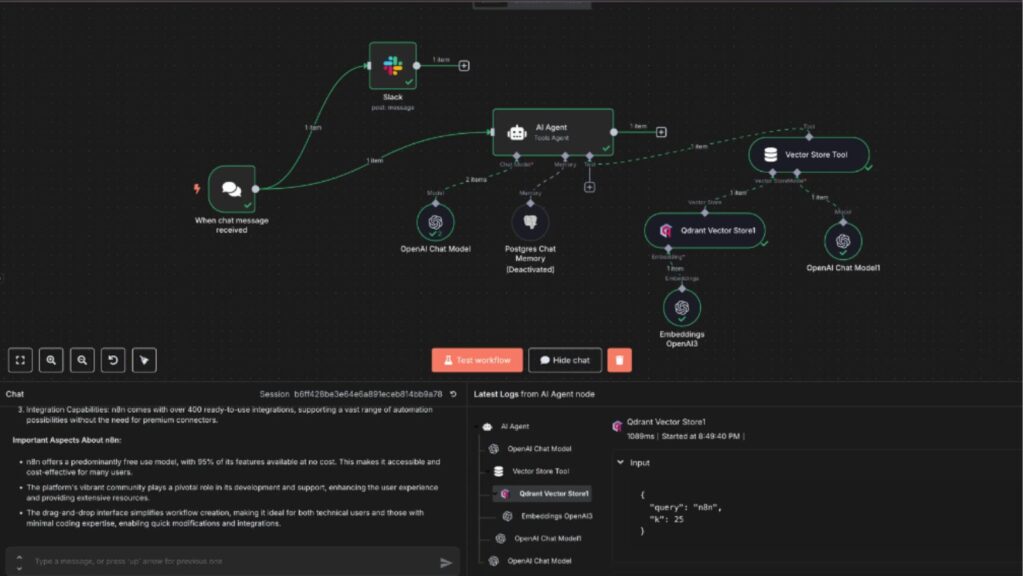
N8N is one of the most advanced tools that is mainly built for users who are looking for flexibility, scalability, and self-hosting capabilities. Instead of designing for beginners, the tool has given full control over workflows, API’s, databases, and AI systems. The tool is getting popular very quickly across the United States startups and SaaS companies’ workflows. The tools’ node-based architecture allows businesses to create customized automation that they are looking for to maintain privacy without investing any long-term costs.
- Best For
- The tool is best for developers.
- Best for SaaS startups.
- Ideal for AI automation teams.
- Best for technical businesses.
- Ideal for self-hosted environments.
- Key Features
- It is an open-source platform.
- Offer advanced workflow support.
- Offer self-hosting available.
- The tool offers highly customizable options.
- It is a cost-effective tool.
- Pros
- Offer developer flexibility.
- The tool is excellent for AI agents.
- It has a strong API handling.
- Offer better control over data privacy.
- The tool is able to handle large automation.
- Cons
- The tool is suitable for beginners.
- The use of its full potential requires technical knowledge.
- Its setup can take time.
- Real Use Cases
A well-established firm in the United States uses N8N to build an AI-powered lead enrichment workflow that collects LinkedIn data, analyzes lead quality using AI models, updates the CRM, and sends personalized emails. All this without needing any manual command.
Make – An Ideal AI Automation Tool For Visual Workflow
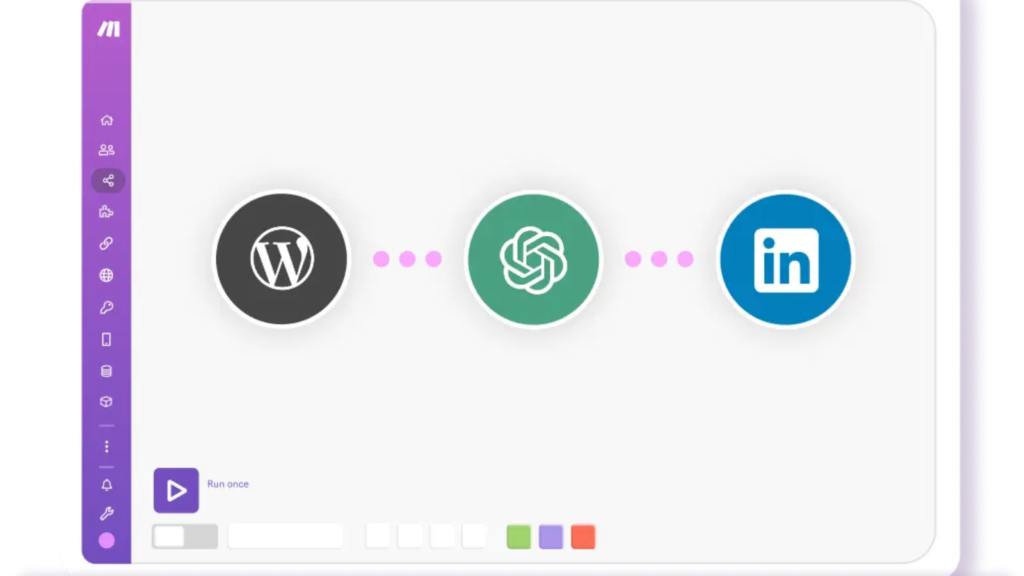
Make is an ideal tool for businesses to automate their operations that have conditions like routers, AI actions, and data transformation across various applications. Unlike other AI workflow automation tools for workflows that don’t give any visual representation of how the workflow operates, Make gives users a clear visual representation of a workflow. In the United States, several marketing agencies, content teams, and many operations managers often use Make for a scalable automation system.
- Best For
- It is a good tool for marketing agencies.
- Best for content teams.
- The tool is best for operations managers who want to avoid delays.
- Best for complex workflow.
- Offer AI automation pipelines.
- Key Features
- Make an offer for a visual workflow map for users.
- Comes with advanced routing features.
- ideal for debugging.
- Comes with strong AI integration.
- Offer a flexible workflow structure.
- Pros
- The tool is great for advanced automation workflows.
- Make offer easy workflow visual mapping.
- The tool handles logic comfortably.
- It offers better control over workflow.
- Cons
- The tool is not beginner-friendly.
- It has a complex interface.
- To use its full potential requires a learning process.
- Real Use Case
A digital marketing agency using Make to automate their blog publishing, AI content, reporting, and client notification. Apart from this, this tool helps them to schedule social media posts over various platforms.
Lindy AI – Best AI Executive Assistance

Lindy AI is a kind of assistance tool that mainly focuses on automating repetitive work and operational tasks. It is different from all those tools that come with heavy technical workflow automation. Instead, Lindy acts like a digital assistant employee who is capable of managing emails, meeting notes, follow-ups, and updating CRM automatically without needing any manual action. The platform is getting popularity quickly across the U.S, especially among the founders and small startups.
- Best For
- The tool is best for founders.
- Better for sales teams.
- Ideal for consultants.
- Remote businesses
- Best for executive assistance.
- Key Features
- It has an AI-powered communication handling system.
- Comes with a fast, easy setup process.
- Able to automate your CRM workflow.
- It is a productivity AI assistant tool.
- Pros
- The tool is able to save you time on repetitive work.
- Easy to use.
- offer the best meeting automation.
- It has very minimal setup requirements.
- Cons
- It has very limited advanced depth.
- Comes with a few customizable options.
- Its AI response may require an overview.
- Real Use Case
In the United States, agencies are using Lidy AI to summarize Zoom meetings, update CRM, records, draft follow email, and many more. The tool is able to schedule tasks automatically without any human action after every sales call.
Workato – Best Enterprise Workflow Automation Tool
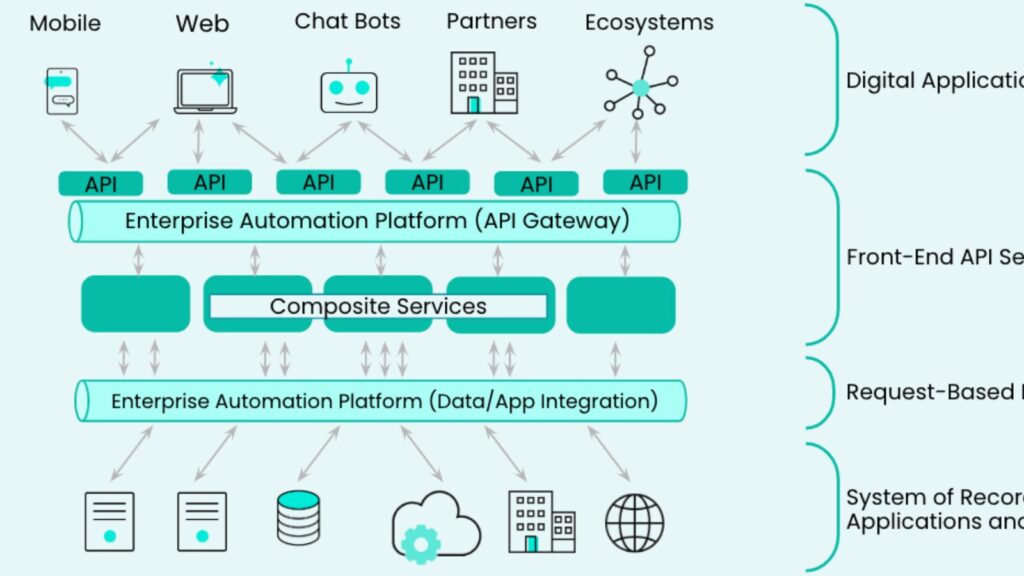
Workato is an enterprise automation AI tool platform that is mainly designed for large organizations that require security, governance, scalability, and enterprise integrations. Workato is capable of combining automation, API management, and AI capabilities into a single screen. The tool is heavily used across the United States in several industries, including the health sector, finance, IT enterprises, operations, and heavy industries. The platform is valuable for high-volume business organizations. As a business owner, you can use the Workato AI tool for invoice generation to save your valuable time.
- Best For
- The tool is best for big enterprises.
- Best for IT teams.
- Ideal for healthcare companies.
- Best to use in a financial organization.
- ideal for large operational businesses.
- Key Features
- Offer security for enterprises.
- It has a scalable infrastructure.
- Comes with advance intergration.
- Offer AI orchestration support.
- The platform focused on compliance automation.
- Pros
- The platform is reliable for heavy businesses.
- Offer excellent enterprise integration.
- It is a strong governance tool.
- Offer secure automation.
- The platform can handle complex workflow automation easily.
- Cons
- The tool is very expensive.
- It is complex to implement.
- The platform is not suitable for small businesses.
- Real Use Case
In the United States, a healthcare organization uses Workato AI workflow automation tools to automate patient data synchronization, billing workflow, CRM updation, and many more without needing any manual action. The best thing about this, too, is that it can maintain compliance and enterprise-level security standards.
These are some of the best AI automation workflow tools that help you obtain the results that you are looking for.
AI Workflow Automation Tools Comparison – 2026
| Tool Name | Best Tool For | Starting Price | Plans | Difficulty Level | Business Case |
|---|---|---|---|---|---|
| Zapier | Best for Beginners and SMBs | $19.99/month | Free Plan Available | Easy | CRM and Email Automation |
| Make | Visual Workflow Automation | $9/month | Free Plan Available | Medium | Marketing Pipelines |
| n8n | Developers and Agencies | Free (Self-Hosted) | Free Plan Available | Advanced | AI Agent Workflows |
| Workato | Enterprise Organizations | Custom Pricing | No Free Plan | Medium | Enterprise Integrations |
| Gumloop | AI-Native Automation | Custom Pricing | Limited Free Plan | Medium | AI-Powered Task Execution |
| Microsoft Power Automate | Microsoft Ecosystem Users | $15/month | Limited Free Plan | Easy | Internal Business Automation |
👉 Swipe left or right on mobile devices to view the complete comparison table.
Best Workflow AI Automation Tools for Social Creators
Today, social creators are not only posting engaging content to build their audience but following every trend. But to follow every trend requires tools that can help to create engaging videos easily. That’s why we have listed some of the best AI automation tools for you. Have a look at it:
Dify – Best AI Tool For Creator
Dify is currently one of the fastest-growing AI tools across the world, and its eye-catching features help users obtain the results that they are looking for. Instead of following the traditional tools path, it focuses not only on app integration but is designed to build AI-powered autonomous agents and creators focused on AI. In real-time, several content creators using DIfy for content research generate automated scripts and AI chatbot workflows without needing heavy coding. Moreover, its open source flexibility makes it attractive for AI Personal Automation Tools For Creators and new creators.
- Best For
- The tool is best for AI creators.
- For new creators.
- Best for AI application builders.
- Best for YouTube automation systems.
- Features
- It supports the RAG pipeline.
- Comes with visual AI workflows.
- It offers visual workflows.
- Able to do multi-model AI integration.
- offer a knowledge base system for users.
- Offer API integration.
- Pros
- The tool is dedicatedly designed for AI workflows.
- It has an open-source ecosystem.
- The tool is ideal for AI agent systems.
- The tool is great for custom creators.
- Dify can support multiple AI models at a single time.
- Cons
- The tool requires workflow planning knowledge.
- The tool has a smaller integration compared to other tools like Zapier.
- Might be difficult for beginners.
Clay – Best Tool To Create Audience
In recent days, Clay has reportedly grabbed a wide range of attention across the United States due to its wonderful AI-powered enrichment and audience intelligence. The tool is mainly designed for sales workflows, but creators actively use Clay to automate audience research, partnership discovery, sponsor prospecting, and many more. The tool is able to organize several things into one operational system, such as AI research, workflow automation, internet data enrichment, and much more, within a few clicks.
- Best For
- The tool is best for creators’ growth.
- Ideal for influencer outreach.
- Best tool to manage sponsorship.
- Able to understand audience intelligence.
- It offers networking automation.
- Features
- Comes with an AI enrichment workflow.
- Able to research the audience automatically.
- Offer data scraping.
- CRM workflows.
- Offer AI personalization.
- Pros
- The tool has excellent research capabilities.
- Offer a strong enrichment engine.
- The tool is ideal for creator partnerships.
- Offer powerful audience analysis.
- Cons
- The tool can be expensive for small creators.
- Requires a learning curve for advanced workflows.
Pipedream – Best Tool For API-Based Creator Automation
Pipedream is mainly designed for a developer-focused workflow automation platform. As a tool, is offering better flexibility compared to Zapier or other tools. This outstanding flexibility makes it one of the best tools for technical creators. Apart from this, it is useful for creators automating YouTube API’s, Social media API’s, AI content pipelines, and much more. Many AI creators preferred Pipedream as it allows them to do direct coding inside automations.
- Best For
- The tool is best for technical creators.
- Best for API-heavy workflows.
- Offer YouTube analytics systems.
- Offer advance automation system.
- Features
- Offer serverless workflows.
- API Integration.
- Offer webhook automation.
- Comes with AI integration.
- Provide custom code support.
- Pros
- The tool is extremely flexible, which makes it more valuable.
- The tool is capable of handling API.
- Ideal for advanced creators.
- Allow quick execution.
- Cons
- The is require technical knowledge to use.
- It has a smaller beginner ecosystem.
- Not as friendly as other available tools.
SimplAI – Best Emerging AI Agent
SimplAI is one of the newer AI workflow platforms, and its multi-workability makes it unique in the market. The tool heavily focused on multi-agent orchestration, workflow governance, and AI execution systems. Early users describe this tool as closer to an AI tool for an operating system. SimpleAI supports memory systems, RAG pipelines, human approvals, and observability.
- Best For
- The tool is best for AI-native creators.
- Offer multi-agent workflow options.
- Offer autonomous publishing systems.
- Offer scalable AI operations.
- Features
- The tool has an AI memory system.
- It comes with RAG workflows.
- It has an approval system.
- Offer enterprise-level observability.
- Pros
- The tool has a modern AI architecture.
- Offer excellent autonomous workflow handling.
- Great for AI operations.
- It is a future-focused platform.
- Cons
- Its new ecosystem can be difficult for beginners to use.
- It has limited tutorials.
- It has an advanced learning curve.
These AI workflow automation tools for creators help to obtain results and follow trends without missing any chance.
Who Should Use This AI Workflow Automation Tool?
It is important to understand that not every AI tool or platform is designed for the same user. Here, you need to understand that some tools are built for simple automation work and handle small or medium range workflow, while others are mainly built for developers, agencies, enterprises, or to handle heavy workflow. Before choosing any AI tool or platform, businesses need to consider some factors such as technical expertise, their budget, platform complexity, integration needs, and all. If you want to understand everything in detail, we have a breakdown of each tool that is best for:
1. Zapier – Known for its Simplicity and Best for Small Businesses
Zapier can be an ideal choice for all those businesses that want to automate their workflow without writing code. Its easy integration features and beginner-friendly interface make it an ideal choice for companies and small businesses.
- Tool is Best For :
- Small Businesses.
- New startups.
- Marketing teams.
- Best for the sales team.
- Ideal for a customer support team.
- Common Use Cases
- The tool offers lead capture automation.
- Offer CRM update.
- Comes with email marketing workflow.
- Organizations use it for social media scheduling.
- It has a feature to book an appointment automatically.
Why Choose the Zapier AI Platform
- If you are planning to automate all repetitive business tasks without expanding the team or hiring a developer.
2. Make AI Platform – The Tool is Best For Marketing Agencies
Make can be an ideal choice if you require advanced workflow logic, compared to any other tool. It offers a visual workflow building experience.
- Make is Best For:
- The platform is best for digital marketing agencies.
- Offer to e-commerce businesses.
- An ideal choice for startups and Saas.
- Allow you to grow your company’s multiple workflow automations.
- Common Use Cases
- Usually, businesses use the Make AI platform to build marketing campaign automation.
- Mainly used in content publishing workflows.
- Data offer processing.
- Why Choose Make AI Platform
- Businesses that are looking for a tool with flexible workflow, logic, and often find a strong AI platform that offers everything in a single place.
3. N8N – Best Tool for Developers, Agencies & Technical Teams
If you are looking for a tool that can offer you full control over your workflows, N8N could be a first choice. It has several eye-catching features like a self-hosting option, API flexibility, and easy integration capabilities, making it popular among professionals around the world.
- Best For Professionals
- Best for software developers.
- AI startups.
- The tool is better for SaaS companies.
- Technical Agencies.
- Ideal for business with a custom workflow.
- Common Use Cases :
- AI agent automation.
- API integration.
- Large-scale automation system.
- Data Processing.
- Custom Workflow.
- Heavy-scale automation system.
- Why Choose N8N?
- N8N is one of the best tools for those who prioritize flexibility, data ownership, advanced workflow, and customization.
4. Workato – Best for Heavy Enterprises
Workato is mainly designed for heavy enterprises that manage complex business across multiple departments.
- Best For
- The tool is a good enterprise organization.
- Ideal tool for heavy corporations.
- Finance departments.
- HR teams.
- IT team.
- Common Use Cases
- ERP Integration.
- Internal workflow automation.
- Compliance management.
- HR Automation.
- Financial Operation.
- Why Choose Workato?
- Workato is a suitable tool for large enterprises that require heavy security, scalability, governance, and advanced system integration.
5. Gumloop – Best For AI Business
Gumloop mainly focuses on AI automation and intelligent workflow execution. This amazing capability makes it attractive for organizations experimenting with AI-driven processes.
- Best For
- Best for AI startups.
- Content teams.
- Research Team.
- AI Consultant.
- Business exploring AI.
- Common Use Cases
- Using in AI-Powered research work.
- Content generation workflows.
- Lead enrichment.
- Smart automation for the task.
- Why Choose Gumloop?
- Businesses that are planning to combine workflow automation with AI capabilities to achieve better results. Gumloop offers a solution for modern AI-driven operations.
6. Microsoft Power Automation
Microsoft Power Automate is an ideal choice for businesses that are already using Microsoft products.
- Best For
- Microsoft 365.
- Large corporate teams.
- Operations managers.
- Administrative teams.
- Government organizations.
- Common Use Cases
- Approval Workflows.
- Used for employee onboarding.
- Document Management.
- Internal reporting.
- Outlook & Teams automation.
- Why Choose Microsoft Power Automation?
- Organizations or corporate who have heavily invested in Microsoft 365, Teams, Outlook, Excel, SharePoint, and many more can create seamless workflow automation without additional software.
Choosing the right automation tool depends on your business goals. If you are looking for a tool that can handle a heavy automation workflow, tools like Zapier can be a great choice. Analyzing business goals before buying an AI tool is a necessary process.
Real-World AI Workflow Automation Example
AI workflow automation is not limited to heavy industry; in the modern year 2026, United States businesses are using AI-powered workflow tools to reduce work pressure. These AI tools are capable of eliminating repetitive work, speeding up, improving customer response times, cutting operational costs, and saving money. Smart AI tools like Zapier, N8N, Make, and Workato are helping businesses in the United States and across the world to automate complex processes like sales, customer service, marketing, and finance on the go.
Here we have listed some real-world workflow automation examples for you. Have a look at it to understand it.
1. Real-Estate Lead Automation Workflow
In the United States real-estate industry is adapting Ai tool quickly than your thinking. The main reason behind this is that earlier, several real-estate agents often lost leads due to delayed response time. But AI solved this issue by instantly responding, capturing, qualifying, and nurturing leads automatically.
- Example of AI Workflow in Real-Estate
- Facebook Leads – CRM – AI Qualification – SMS and Email Follow-Up automatically – Calendar Booking. All these without any manual action.
- How does this AI Workflow Work?
- First, a potential buyer submits their information through a Facebook or Google lead form.
- The AI automatically sends this information to CRM for further action.
- As per the lead, AI analyzes the buyer’s budget, location, urgency, and property interest.
- Once AI checks everything, it sends instant personalized emails and SMS follow-up to all qualified leads automatically.
- Also, AI schedules a property consultation on a call without needing any manual action.
- AI Impact on Businesses
- AI speeds up response time and increases conversion rates.
- Taking less time to enter data compared to manual entry.
- AI helps to identify high-intent property buyers.
- Teams can easily handle large lead volumes without needing to expend staff.
- Why are businesses adopting AI In The US?
In this competitive US real-estate, quick response matters a lot as buyers contact several agents. That’s why many agencies automate the first few minutes of customer communication. Platforms like Zapier, N8N, and others are mainly used for CRM syncing and automated lead routing without following any heavy technical setups.
2. E-commerce Customer Support Automation
In the United States, many e-commerce brands deal with thousands of repetitive customer support requests. Here Ai workflow automation tool reduces support load by automating repetitive tasks and queries. This not only reduces load but also improves customer satisfaction and experience.
- AI Workflow Example
Shopify Order – AI support agent – Order Tracking – Help Desk Ticket – At the end, Slack Notification.
- How Does It Work?
- A customer places an order.
- The AI workflow updates the inventory and shipping system automatically.
- An AI automates the order confirmation email sent instantly.
- If customers ask any questions related to the delivery, refund, or return, AI bots provide answers as per the company’s policies.
- If the issue is complex, AI sends it to human support teams.
- AI Impact on Businesses
- AI reduces support ticket volume.
- Provide quicker customer response than a human.
- Elevate order transparency.
- Reduce operational costs.
- Real-World Value of AI
In the United States, many businesses use AI tools to handle repetitive customer queries, such as :
- Where is my order?
- How can I return an item instantly?
- At what time or when will my order arrive?
Completing these repetitive tasks automatically allows the customer support team to focus on higher-value customer interaction.
3. AI-Powered Marketing Content Workflow
In the US, several giants and startups are increasingly using AI automation to boost content production and campaign management.
- AI Workflow Example
Client Brief Form – Reach to Database – AI content draft – Goes for Human approval – At the end, WordPress Publishing.
- How Does AI Workflow Automation Work?
- Client submits its campaign requirements through the form.
- AI automation stores the request inside the Notion or Airtable tool.
- AI starts generating blog outlines, social media post captions, email copy, and ad headlines.
- Once done with the creation part, send it for approval.
- After approval, the content is scheduled for publishing or published automatically at the same time.
- Impact of AI on Business
- AI can execute a campaign automatically.
- It eliminates manual coordination.
- Offer higher content production volume easily.
- Offer better consistency compared to humans.
- Why AI Tools Matter?
In the United States, most of the agencies often manage dozens of clients continuously. AI helps agencies to reduce repetitive work and allows the team to focus on creative strategy and performance optimization.
There are some platforms like Zapier and Make that are mainly known for marketing automation because they come with features to connect with tools like –
- Hubspot.
- MailChimp.
- WordPress.
- Slack.
- Google Sheet.
- Notion.
This unique feature of connectivity makes AI an ideal choice for businesses.
4. HR Recruitment & Resume Screening Automation
AI is capable of streamlining the recruitment process by quickly finding suitable candidate resumes and sending them invitation emails without needing any manual action. Where earlier hiring teams took up a big part of their time reviewing resumes, scheduling, and sending emails.
- AI Workflow Example
First resume submission – AI analyzes resume – Candidate scoring – Schedule an interview – At the end, HR notification.
- How Does It Work
- Job applicant uploads a resume through the hiring form.
- AI extracts candidate skills, experience, and qualifications automatically.
- AI gives a candidate a score as per their job requirements.
- AI sends top candidate summaries to the HR team.
- AI Impact On Business
- AI speeds up the hiring process.
- reduce manual review time.
- IA is improving candidate experience.
- Offer better recruitment service.
5. AI Finance & Invoice Processing Workflow
In the finance sector, teams often receive repetitive invoice approvals, expense categorization, and reporting tasks. An AI workflow automation tool or platform can complete repetitive work without needing manual action and nearly eliminate human errors in the task.
- AI Workflow Example
First Invoice Uploaded – OCR data extraction process – AI starts categorization – Approval Routing – At the end, accounting software sync.
- AI Impact on Business
- Reduce invoice approval time and give quick approval.
- Offer lower processing costs.
- Eliminate human accounting errors.
- Offer better financial tracking.
Modern AI workflow tools are capable of handling several invoices with less human intervention.
6. AI Sales Lead Qualification Workflow
Across the world, sales teams waste their time on unqualified leads. AI workflow automation helps to find high-intent leads that are most likely to convert. This reduces work pressure and boosts conversion as well.
- AI Workflow Example
Starting with website form – AI data enrichment – AI gives lead scoring – Assign to CRM – Personalized Outreach.
- How Does AI Workflow Automation Work?
- Lead submission through forms on the website.
- AI gathers data such as company name, size, Industry, technology, and location.
- Leads are received, and AI automatically scores them.
- High score or priority leads are assigned to the sales team instantly.
- AI starts generating personalized emails.
- AI Impact on Business
- AI provides higher conversion rates.
- Offer quick follow-ups.
- Reduce manual research.
- Offer a better sales pipeline.
In the United States, AI lead scores are getting popular very quickly because it improves sales conversion without needing to expend a team.
This is how real-world AI workflow automation works for different industries and offers you better results than you are expecting.
How to Choose the Best Workflow AI Tools?
Today, choosing the best AI tool can feel overwhelming as the market is flooded by several AI tools. Everone is offer their unique and eye-catching features, but not everyone is reliable. To identify the best tool for you, we have mentioned the points for you. Let’s check it.
- Identify Your Actual Problem – Do not go for any tool that is famous in the market. Always start with:
- What tasks waste your time the most?
- Repetitive work that you want to automate.
- What output are you looking for?
- First check whether the tool saves time or not – Many Ai tool looks futuristic but require:
- complex setup.
- several integrations.
- Prompts.
- Choose As Per Your Work – Choose an AI tool as per your work, like:
- If you are a creator, go for AI tools that can write scripts and create videos.
- Choose tools that can generate thumbnails.
- Able to schedule social content.
- For SEO & Bloggers – If you are an SEO and blogger, go for a tool that can:
- A tool that can offer keyword clustering.
- Help to create topical maps.
- Offer SERP analysis.
- Allow content optimization.
- Test Tool First – Before buying, there are some things that you need to test. Such as :
- Tools speed.
- Tools Accuracy.
- Check if the tool offers ease of use.
- Offer integration or not.
- Check its pricing first.
These are some of the points that you need to check or follow before choosing an AI workflow automation tools.
Why is AI Workflow Automation Growing Quickly?
In the United States, companies are not using AI only for customer response or completing repetitive work. Instead, they are using AI as a decision-making tool. Smart AI workflows come with :
- Smart AI workflow tools come with automation logic.
- Comes with AI reasoning.
- Offer app integration within a few clicks.
- Data processing.
- Offer customer support communication.
These smart features allow businesses in the US and across the world to automate workflows that earlier usually require human force.
Things To Avoid While Choosing an AI Tool
There are some things that you are expected to avoid while choosing the best AI tool for your work.
- Do not go for all-in-one tools, as such tools lack performance.
- While choosing a tool, do not ignore workflow compatibility. Because even a great tool can become a burden if it does not fit with your compatibility.
- Do not depend on AI fully, as it can backfire.
- Do not buy early plans too early without checking their full potential and features.
Avoiding these mistakes will help you to choose the best AI tool for your work without losing your money.
Neuroaiverse Expert Opinion: Are AI Workflow Automation Tools Worth It in 2026?
After testing a bunch of AI workflow automation tools and real-world business use cases, it is clear that the automation tools are becoming necessary for modern businesses to survive in the competitive market. In 2026, companies are not using AI tools only to save their time, but they are using these smart tools to elevate their customer experience, speed up response time, reduce operational costs, and reduce errors on the go.
For small or mid-size businesses in the United States, tools like Zapier and Make can be an ideal choice. These tools require minimal technical setup and offer integration with popular business platforms like Google Sheets, Gmail, HubSpot, Slack, and Shopify. These important platforms play a key role in automating business without needing a dedicated team.
Moreover, developers are focusing on platforms like N8N that come with unique features which make it popular among startups, Saas companies, and several agencies that require flexibility. However, most enterprise organizations prefer platforms like Workato or Microsoft Power as they offer stronger internal system integrations and an advanced workflow automation system. The biggest benefit of an AI workflow automation is its ability to automate repetitive work. This simply allows businesses to automate tasks such as lead routing, customer follow-ups, invoice approvals, appointment scheduling, and many more, without going through a long technical setup.
In our opinion, to get the best results from an AI workflow automation tool starts with a small system and expands into a more advanced system gradually. Big businesses don’t automate everything at once; instead, they focus on solving specific operational steps first before moving ahead. Overall, AI workflow automation tools are worth it for businesses that handle consistently repetitive digital operations at a large scale.
Conclusion
AI Workflow Automation Tools mainly help users to automate their repetitive work that is consuming most of their time and energy. AI tools can complete repetitive tasks without needing any second command. The best thing is that it simply reduces manual action and offers you free time to think about your business or content.
AI workflow automation tools for small business allow them to obtan result that they are looking for. AI automation comes with great research features and is capable of maintaining your privacy without losing any sensitive information to the public. However, if you are looking for a tool, first identify your need and then buy a tool.
FAQ’s
Q – What are AI workflow automation tools?
Ans – AI workflow automation tools are software platforms that automate repetitive tasks using artificial intelligence. They help businesses and creators manage content, emails, scheduling, customer support, data entry, and marketing workflows faster with less manual work.
Q – Are AI workflow automation tools worth it for small businesses?
Ans – Yes, AI workflow automation tools can save small businesses hours of manual work every week. They help reduce human errors, improve team productivity, automate customer communication, and streamline daily operations without hiring extra staff.
Q – Can creators use AI workflow automation tools?
Ans – Absolutely. Content creators use AI workflow automation tools to automate video publishing, social media scheduling, email newsletters, content repurposing, and audience management across multiple platforms.

My name is Sachin, an SEO Expert and Technical Content Writer covering AI tools, productivity software, and digital marketing. I write practical, research-backed guides to help individuals and businesses find the right technology to grow faster and get more done.